Translations:Manuals:BXFbl:Setupmenu E/8/de: Difference between revisions

From BEASTX Wiki
Jump to navigation Jump to search
Created page with "=Einrichtung mit der StudioX-App= * Wenn du den Heckrotorhebel vollständig auslenkst, sollte die Status-LED am BEASTX-System durchgehend leuchten und das Label ''rechts'' ode..."
(No difference)

Revision as of 14:24, 4 June 2024

Information about message (contribute)
This message has no documentation. If you know where or how this message is used, you can help other translators by adding documentation to this message.
Message definition (Manuals:BXFbl:Setupmenu E)
=Setup with StudioX app=
* When you move the rudder stick to full deflection, the Status LED on the BEASTX system should light solid and the label ''right'' or ''left'' should change the color accordingly. If the stick is not moving far enough, you will see the message "Increase!" In this case '''increase the servo throw/endpoint of the rudder channel in the transmitter just as far so that the Status LED changes from flashing to solid when the rudder stick reaches the end position''' and the label will disappear in the software. Repeat this for the other direction. Note: Do not increase the endpoint too much in the transmitter. We need an exact match of full stick position and stick end position. So the Status LED should just change from flashing to solid when raching the end position.<br />
<br />
<html>
 <div class="ios-gallery-container">
       <!-- Erstes Bild und Text -->
       <div class="ios-gallery-item">
           <div class="ios-gallery-image">
               <img src="https://wiki.beastx.com/images/studiox/freakware%202019-07-09%20037.PNG" alt="Screenshot">
           </div>
           <div class="ios-gallery-text">Stick moved into one direction, deflection not enough!</div>
       </div>
       <div class="ios-gallery-item">
           <div class="ios-gallery-image">
               <img src="https://wiki.beastx.com/images/studiox/freakware%202019-07-09%20038.PNG" alt="Screenshot">
           </div>
           <div class="ios-gallery-text">Stick moved into one direction, maximum position reached!</div>
       </div>
</div>
</html>
<br />
* Now check the rudder direction of the servo on the helicopter. '''If the stick is moving the servo into the wrong direction use the servo reverse function of your transmitter''' and reverse the rudder channel to set stick control direction correctly. When the servo is moving correctly, set the rudder direction of the BEASTX gyro: When you move the rudder stick/servo to the <span style="color: #4169E1;">'''right'''</span>, the Status LED must light up or flash in <span style="color: #4169E1;">'''blue'''</span> color. When you move the rudder stick to the <span style="color: #DC143C;">'''left'''</span>, the Status LED must light up or flash in <span style="color: #DC143C;">'''red'''</span> color. '''When the display is inverted (red = right and blue = left), reverse the display (internal control direction) by choosing either ''normal'' or ''inverted'' in the software.'''<br />
<br />
<html>
 <div class="ios-gallery-container">
       <!-- Erstes Bild und Text -->
       <div class="ios-gallery-item">
           <div class="ios-gallery-image">
               <img src="https://wiki.beastx.com/images/studiox/freakware%202019-07-09%20038.PNG" alt="Screenshot">
           </div>
           <div class="ios-gallery-text">Stick moved left, but label shows right!</div>
       </div>
       <div class="ios-gallery-item">
           <div class="ios-gallery-image">
               <img src="https://wiki.beastx.com/images/studiox/freakware%202019-07-09%20041.PNG" alt="Screenshot">
           </div>
           <div class="ios-gallery-text">Stick moved left, label shows left!</div>
       </div>
</div>
</html>
<br />
* Finally adjust the servo limit by changing the values in the two adjustment boxes for each direction. To do so, carefully use the rudder stick to move the servo to the endpoint (watch out to not jam the servo) and increase/decrease the endpoint as necessary.<br />
<br />
<html>
 <div class="ios-gallery-container">
       <!-- Erstes Bild und Text -->
       <div class="ios-gallery-item">
           <div class="ios-gallery-image">
               <img src="https://wiki.beastx.com/images/studiox/freakware%202019-07-09%20040.PNG" alt="Screenshot">
           </div>
           <div class="ios-gallery-text">Use + and - buttons to adjust endpoint.</div>
       </div>
</div>
</html>
<br />
<br />

Einrichtung mit der StudioX-App

  • Wenn du den Heckrotorhebel vollständig auslenkst, sollte die Status-LED am BEASTX-System durchgehend leuchten und das Label rechts oder links sollte entsprechend die Farbe ändern. Wenn der Hebel nicht weit genug bewegt wird, erscheint die Nachricht "Increase!". In diesem Fall erhöhe den Servo-Ausschlag/Endpunkt des Heckrotorkanals im Sender so weit, dass die Status-LED vom Blinken zum Durchgehend-Leuchten wechselt, wenn der Heckrotorhebel die Endposition erreicht. Das Label verschwindet dann in der Software. Wiederhole dies für die andere Richtung. Hinweis: Erhöhe den Endpunkt im Sender nicht zu stark. Wir brauchen eine genaue Übereinstimmung der vollen Hebelposition und der Endposition des Hebels. Die Status-LED sollte also genau beim Erreichen der Endposition vom Blinken zum Durchgehend-Leuchten wechseln.


<img class="ios" src="freakware%202019-07-09%20037.PNG">
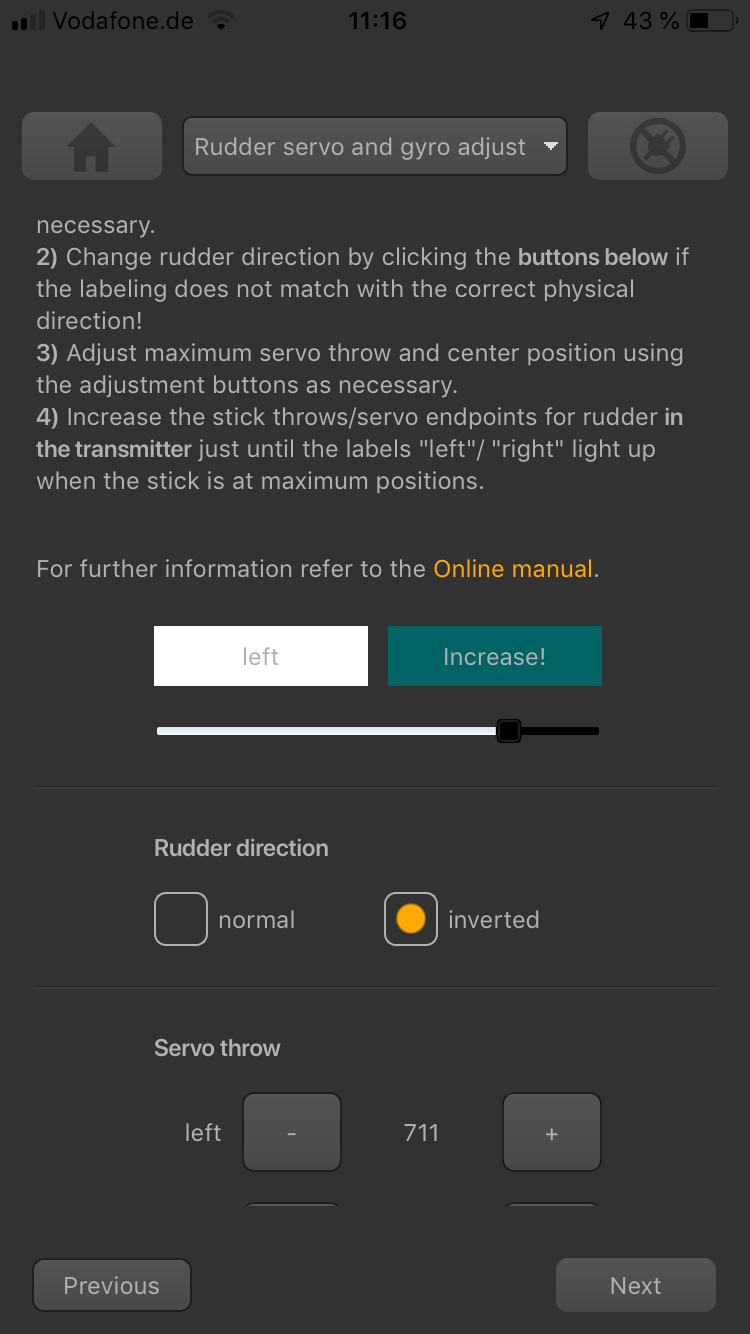
Heckrotorhebel in eine Richtung bewegt, Auslenkung nicht ausreichend

<img class="ios" src="freakware%202019-07-09%20038.PNG">
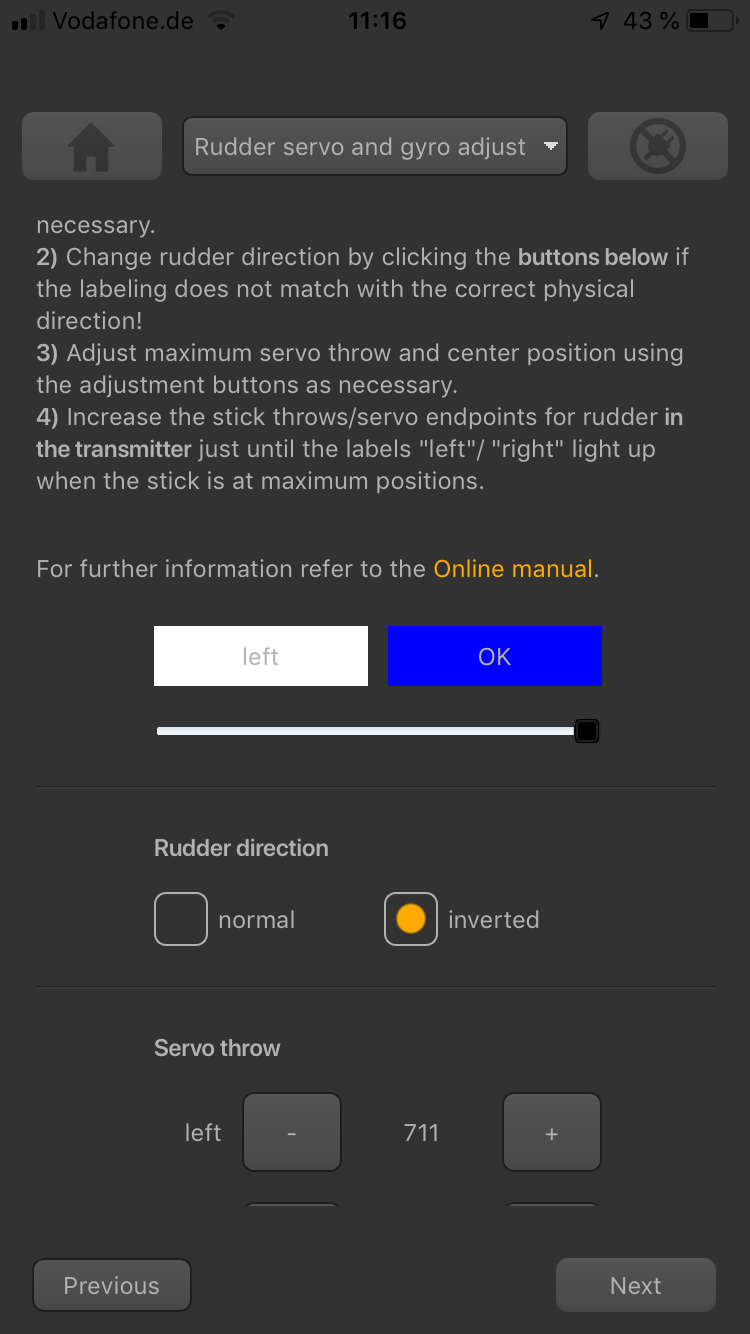
Heckrotorhebel in eine Richtung bewegt, maximale Position erreicht


  • Überprüfe nun die Heckrotorrichtung des Servos am Hubschrauber. Wenn der Hebel das Servo in die falsche Richtung bewegt, verwende die Servo-Reverse-Funktion deines Senders und kehre den Heckrotorkanal um, um die Steuerungsrichtung des Hebels korrekt einzustellen. Wenn das Servo richtig bewegt wird, stelle die Heckrotorrichtung des BEASTX-Gyros ein: Wenn du den Heckrotorhebel/das Servo nach rechts bewegst, muss die Status-LED in blau leuchten oder blinken. Wenn du den Heckrotorhebel nach links bewegst, muss die Status-LED in rot leuchten oder blinken. Wenn die Anzeige invertiert ist (rot = rechts und blau = links), kehre die Anzeige (interne Steuerrichtung) um, indem du in der Software normal oder inverted wählst.


<img class="ios" src="freakware%202019-07-09%20038.PNG">

Heckrotorhebel nach links bewegt, aber Label zeigt rechts

<img class="ios" src="freakware%202019-07-09%20041.PNG">
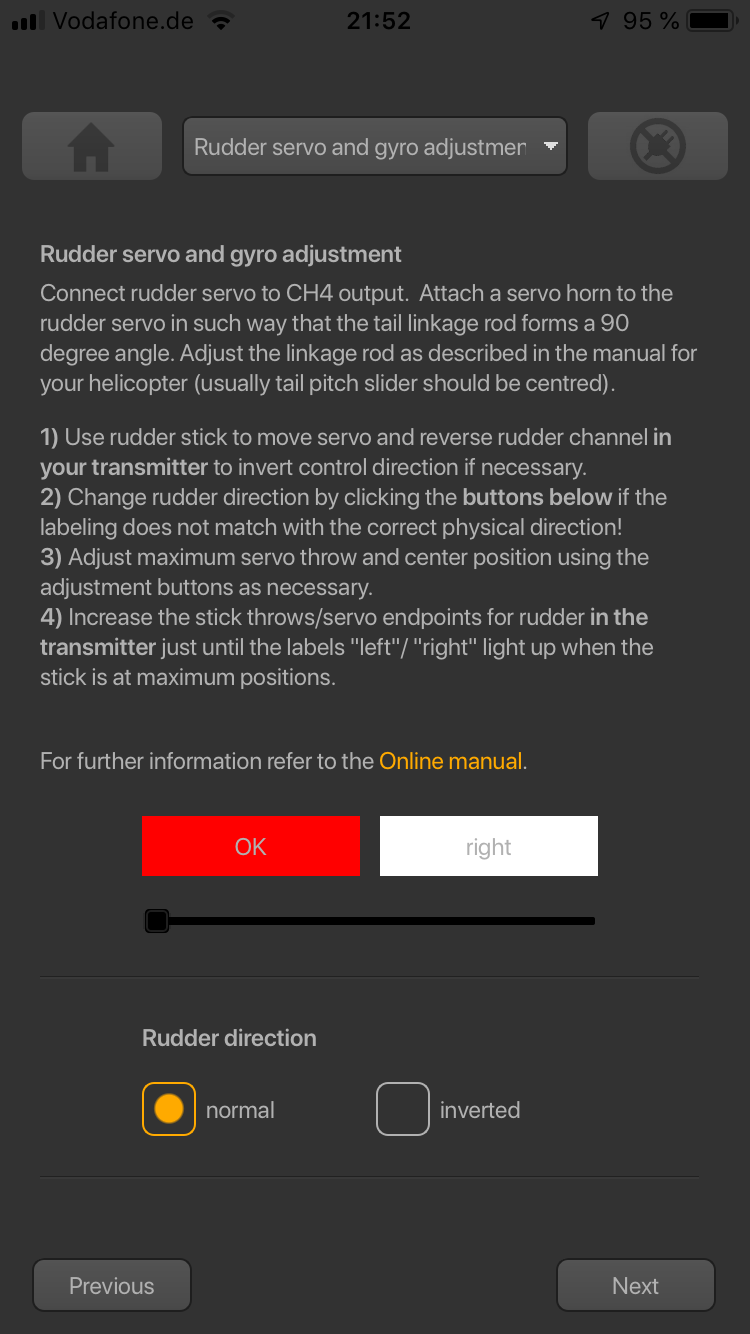
Heckrotorhebel nach links bewegt, Label zeigt links


  • Schließlich passe die Servogrenze an, indem du die Werte in den beiden Einstellfeldern für jede Richtung änderst. Verwende dazu den Heckrotorhebel vorsichtig, um das Servo zum Endpunkt zu bewegen (achte darauf, das Servo nicht zu blockieren) und erhöhe/verringere den Endpunkt nach Bedarf.


<img class="ios" src="freakware%202019-07-09%20040.PNG">