Translations:Manuals:MBPlusFblV5:Setupmenu A/2/en
Adjustment at the device
Select the orientation that the device is actually mounted on your heli. There are 8 possible options indicated by the color of the Status-LED. You can switch between the options by briefly moving the rudder stick to one or the other direction. The Status-LED will change the color accordingly.
| Status-LED | Device orientation |
|---|---|
| off | flat, sticker on top side, socket points in flight direction |
| purple flashing | vertical, button is on the top, socket points in flight direction |
| purple | flat inverted, sticker on bottom side, socket points in flight direction |
| red flashing | vertical inverted, button is on the bottom, socket points in flight direction |
| red | flat, sticker on top side, socket points to the tail boom |
| blue flashing | vertical, button is on the top, socket points to the tail boom |
| blue | flat inverted, sticker on bottom side, socket points to the tail boom |
| red/blue | vertical inverted, button is on the bottom, socket points to the tail boom |
-
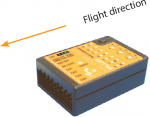 Status LED off
 -
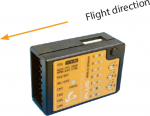 Status LED purple flashing
 -
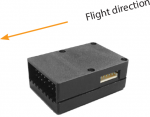 Status LED purple
 -
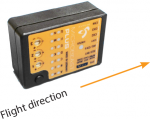 Status LED red flashing
 -
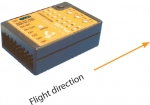 Status LED red
 -
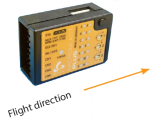 Status LED blue flashing
 -
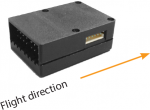 Status LED blue
 -
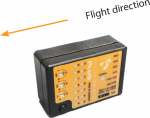 Status LED red/blue


When finished briefly push the button to save the configuration and to proceed to Setup menu point B.
